Agencies book, guests travel.
Take tour bookings from travel agencies, with invoices and monthly statements.
An agency enters its agency code at checkout and books for its client. The booking keeps the guest's details, the agency's contact and billing details stay on an agency record, and each email goes to the right person. Agencies on invoice terms pay by invoice, and you settle the month with one statement and one payment.
Single payment per year · 14-day refund · One Pro license unlocks every module on this tier.
Why Travel Agencies matters for tour operators
When an agency books for a client, a normal checkout mixes up two people: the agency that pays and the guest who travels. Confirmations with prices go to the guest, pickup reminders go to the agency, and at the end of the month you match one bank transfer against a dozen bookings by hand.
What changes once Travel Agencies is on
Concrete operational outcomes — not feature checkboxes.
- Agencies book with an agency code, or automatically when one of their WordPress users is logged in.
- The booking keeps the guest's name, email and phone; the agency is linked to it.
- Booking and payment emails go to the agency, tour emails (pickup reminder, consent forms, review request) to the guest. Each group can be switched.
- Agencies on invoice terms can choose Pay by invoice. Those bookings never expire for being unpaid.
- A monthly statement per agency, as a PDF or by email, and one recorded payment applied across the month's bookings.
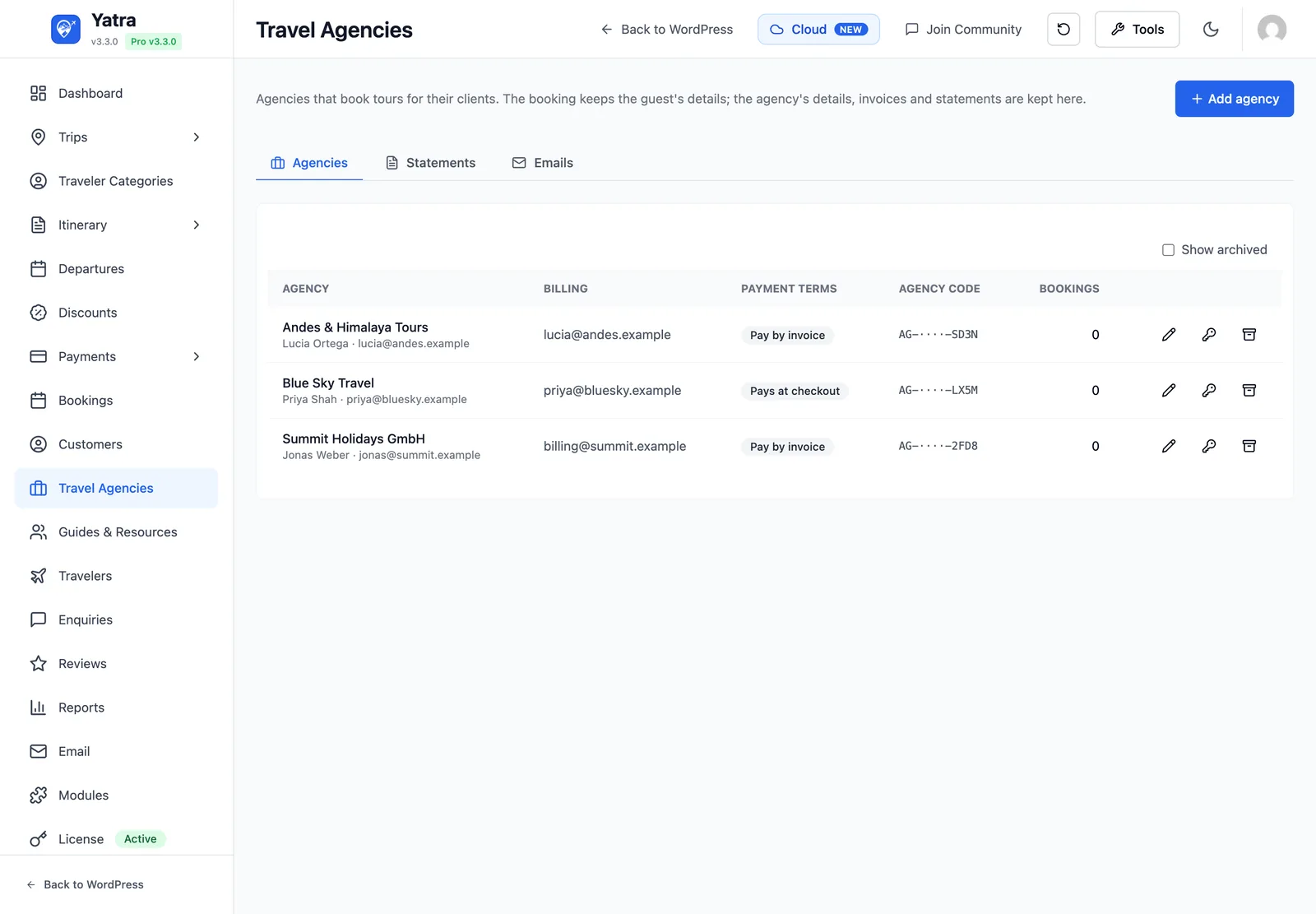
See Travel Agencies in Yatra
Real screens from a Yatra demo site. Click to enlarge.
What Travel Agencies unlocks in Yatra
Every surface, every toggle, every audit trail — covered.
Agency records
Name, contact person, email, billing email, phone, billing address, VAT number, payment terms and internal notes.
Agency codes
Shown once when you save the agency and stored hashed. Issue a new code at any time; the old one stops working.
Email routing
Choose Agency, Guest or Agency and guest for booking, payment and tour emails. Your own admin copies do not change.
Pay by invoice
A payment method offered only to agencies on invoice terms. Nothing is charged at booking.
Monthly statements
Every tour an agency's guests travelled on in a month, with totals, paid and due. Download as PDF or email it to the billing address.
One payment, many bookings
Record the amount received once. Yatra applies it oldest tour first, adds a payment record to each booking and sends the agency one receipt.
Pairs with these Yatra Pro modules
Other modules that compose naturally with Travel Agencies. All on the same Pro license — toggle as you need them.
Multi-Trip Cart
Pro · GrowthAn Add to cart button sits next to Book Now on every departure. Customers collect trips and dates, then check out once, with card, PayPal, bank transfer or Pay…
Transactional Emails
FreeThe free Yatra plugin sends about 20 booking emails, from "we've received your booking" to the review request after the trip, plus alerts for your team. Edit t…
Cheque & Multiple Bank Accounts
FreeOffer Cheque at checkout, with who to make it payable to and where to send it. For bank transfers, add up to 10 more accounts and give each a currency: a booki…
How to set up Travel Agencies in Yatra
No engineering. Open Yatra → Modules, toggle, follow the wizard.
-
1
Turn it on
Yatra → Modules → Travel Agencies. A Travel Agencies item appears in the Yatra menu.
-
2
Add an agency
Travel Agencies → Add agency. Copy the agency code Yatra shows and send it to the agency.
-
3
The agency books
At checkout it enters the code, then the guest's details. The booking is linked to the agency.
-
4
Settle the month
Travel Agencies → Statements: pick the agency and month, send the statement and record the payment when it arrives.
Agency bookings without a separate B2B system.
Travel Agencies — Yatra Pro FAQ
Want to feel Travel Agencies in action first? Try Yatra Pro free →
Can travel agencies book tours for their clients on my WordPress site?
Who gets the booking emails?
Can an agency pay later by invoice?
Does the module give agencies a commission or net rates?
Can I link a booking taken by phone to an agency?
Add Travel Agencies to your tour-booking website today.
Yatra Pro · Growth tier · Yearly or Lifetime · Growth or Scale · needs Yatra 3.2+
14-day refund · One license unlocks every module on your tier.