
A departure for one group only.
Private trips: let a group book a departure just for themselves.
At checkout the customer ticks Make this a private trip. Your private-trip fee is added to the price, and from then on nobody else can book that departure. It shows as sold out to everyone else until the booking is cancelled or expires.
Single payment per year · 14-day refund · One Pro license unlocks every module on this tier.
Why Private Trips matters for tour operators
Families, friends and companies often ask for a departure to themselves. Without a way to sell it, you quote by email, block the date by hand and hope nobody else books it in the meantime.
What changes once Private Trips is on
Concrete operational outcomes — not feature checkboxes.
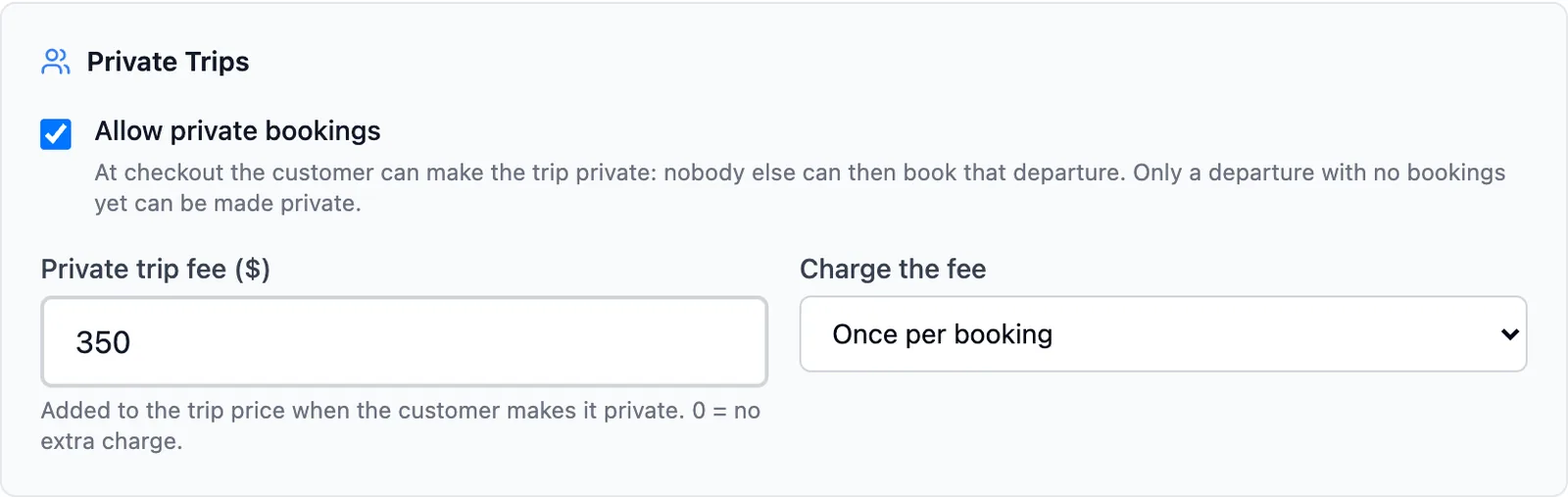
- Allow private bookings trip by trip, with your own fee: once per booking or per traveller, or 0 for no extra charge.
- The fee is a Private trip line in the price, so coupons, taxes, deposits and the invoice treat it like the rest of the price.
- While the private booking holds seats, the departure shows as Sold out on the trip page, the calendar and at checkout, including the admin booking form.
- If the private booking is cancelled, refunded or expires unpaid, the departure opens again.
See Private Trips in Yatra
Real screens from a Yatra demo site. Click to enlarge.

What Private Trips unlocks in Yatra
Every surface, every toggle, every audit trail — covered.
Per-trip setting
Trip → Availability & Booking → Private Trips: Allow private bookings, the fee and how it is charged.
Checkout option
Make this a private trip (+fee) when the departure has no bookings yet; Private trip: not available on this date when it has.
Time slots
For a trip with time slots, the private booking takes its own slot; the other slots that day stay open.
Checked twice
A departure that already has a booking can't be made private. This is checked again when the customer clicks Pay.
Pairs with these Yatra Pro modules
Other modules that compose naturally with Private Trips. All on the same Pro license — toggle as you need them.
Price by Group Size
FreeFor trips priced per person, set a price for each group-size range, for example 1 person 1,500 · 2–3 people 1,300 · 4 or more 1,100. When the number of travell…
Flexible Payments
Pro · StarterMany customers are ready to commit months ahead but not to pay the full price that far out. Flexible Payments adds a deposit or part-payment option next to Pay…
Departures & Availability
FreeRun a trip on fixed dates, on a weekly, monthly or every-few-days schedule, or any day in a season. Each date has its own seats, price and booking cutoff, and …
How to set up Private Trips in Yatra
No engineering. Open Yatra → Modules, toggle, follow the wizard.
-
1
Turn it on
Yatra → Modules → Private Trips.
-
2
Allow it on a trip
Edit the trip → Availability & Booking → Private Trips. Tick Allow private bookings, set the fee and choose per booking or per traveller.
-
3
The customer chooses
At checkout they tick Make this a private trip. The fee appears in the price breakdown.
Sell private departures from the trip page instead of by email.
Private Trips — Yatra Pro FAQ
Want to feel Private Trips in action first? Try Yatra Pro free →
How do I sell private tours in WordPress?
What happens if someone has already booked the date?
Does it work with the Multi-Trip Cart?
Does a private booking close the date on GetYourGuide?
Add Private Trips to your tour-booking website today.
Yatra Pro · Starter tier · Yearly or Lifetime · any plan · needs Yatra 3.3+
14-day refund · One license unlocks every module on your tier.