Local payments where Stripe and PayPal are not an option.
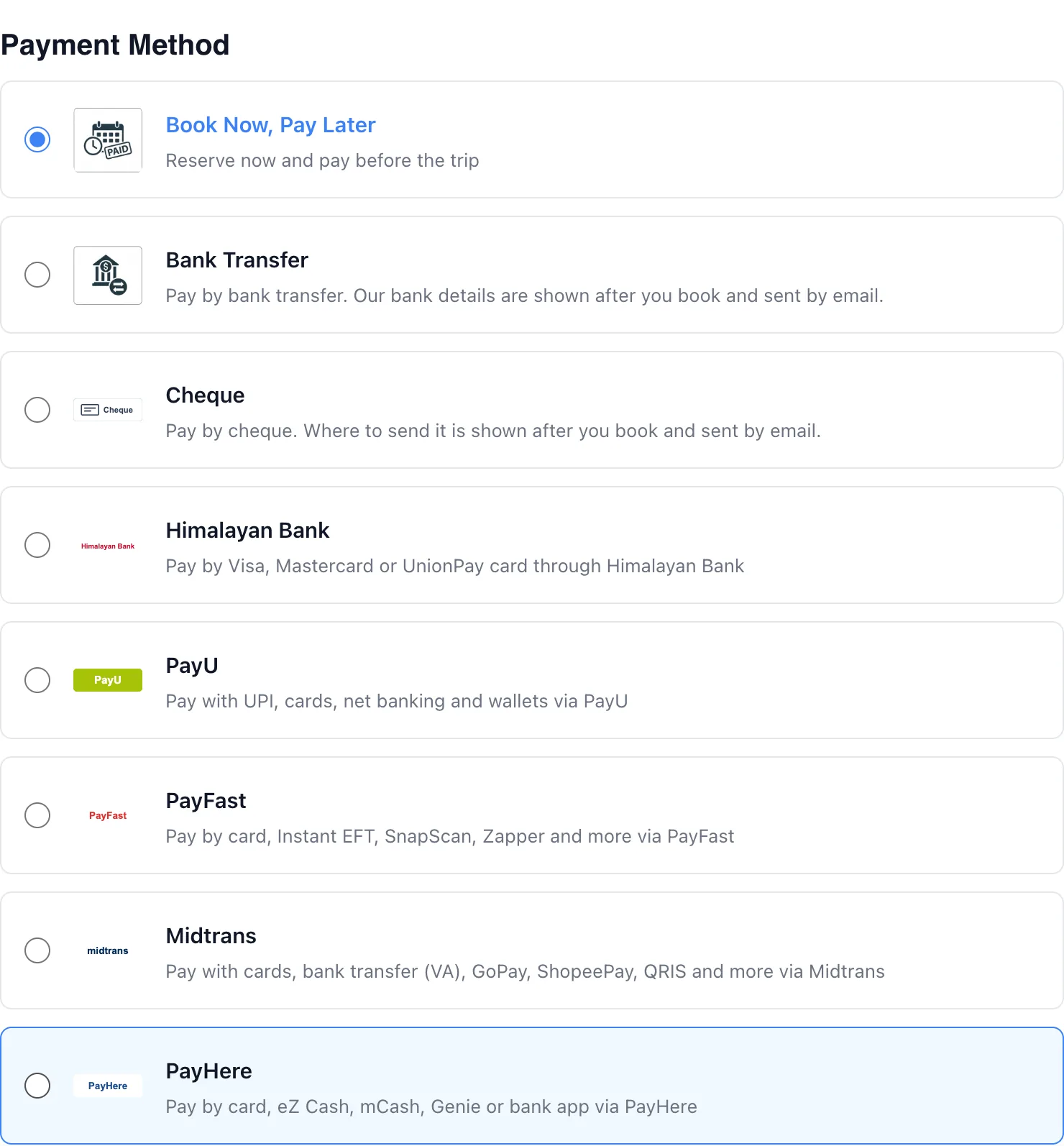
Regional payment gateways: Himalayan Bank, PayU, PayFast, Midtrans and PayHere.
Five gateways for Nepal, India, South Africa, Indonesia and Sri Lanka. The customer pays on the gateway's own hosted payment page and comes back to your confirmation page. Yatra records the payment only when the gateway confirms it. You need a merchant account with each gateway you use, and whether it accepts your business is up to the gateway.
Single payment per year · 14-day refund · One Pro license unlocks every module on this tier.
Why Regional Payment Gateways matters for tour operators
In several of the markets where tour operators sell, Stripe is not available and PayPal is not how customers pay. Without a local gateway, operators send bank details by email and chase payments by hand.
What changes once Regional Payment Gateways is on
Concrete operational outcomes — not feature checkboxes.
- Himalayan Bank (Nepal): card payments on Himalayan Bank's 2C2P PACO payment page, in NPR or USD.
- PayU (India): UPI, cards, net banking and wallets through PayU Hosted Checkout, in INR.
- PayFast (South Africa): cards, Instant EFT, SnapScan, Zapper and more, in ZAR.
- Midtrans (Indonesia): cards, virtual-account bank transfer, GoPay, ShopeePay, QRIS and more through Midtrans Snap, in IDR.
- PayHere (Sri Lanka): cards, eZ Cash, mCash, Genie and bank apps, in LKR, USD, GBP, EUR or AUD as enabled on your account.
See Regional Payment Gateways in Yatra
Real screens from a Yatra demo site. Click to enlarge.
What Regional Payment Gateways unlocks in Yatra
Every surface, every toggle, every audit trail — covered.
Hosted payment pages
Card and wallet details are entered on the gateway's page, not on your site.
Confirmed by the gateway
Yatra asks the gateway whether the payment went through, on the customer's return and from its notification, and records it once, for the amount paid, in the booking's currency.
Currency checks
Each gateway takes only its own currencies. A booking in another currency gets a clear message to choose a different method.
Refunds
Refunds can be sent back through PayU and Midtrans from the booking screen. Other refunds are made in the gateway and recorded in Yatra.
Multi-Trip Cart
All five can pay a Multi-Trip Cart (Growth and Scale plans).
Test mode
Yatra's Test mode switch uses each gateway's sandbox, so use sandbox credentials while it is on.
Pairs with these Yatra Pro modules
Other modules that compose naturally with Regional Payment Gateways. All on the same Pro license — toggle as you need them.
Flexible Payments
Pro · StarterMany customers are ready to commit months ahead but not to pay the full price that far out. Flexible Payments adds a deposit or part-payment option next to Pay…
Multi-Trip Cart
Pro · GrowthAn Add to cart button sits next to Book Now on every departure. Customers collect trips and dates, then check out once, with card, PayPal, bank transfer or Pay…
Booking Workspace & Payment Links
FreeThe booking screen is where you manage the money after checkout. Record a bank transfer or cash payment, add a discount or surcharge with a reason, refund thro…
How to set up Regional Payment Gateways in Yatra
No engineering. Open Yatra → Modules, toggle, follow the wizard.
-
1
Open a merchant account
Apply with the gateway. Each one decides whether to accept your business and gives you its keys once approved.
-
2
Enter the keys
Yatra → Settings → Payments → the gateway. The docs list where to find every key.
-
3
Test on a public URL
Gateways send notifications from the internet, so test with sandbox credentials on a site they can reach before going live.
Local payment methods included in every Pro plan.
Regional Payment Gateways — Yatra Pro FAQ
Want to feel Regional Payment Gateways in action first? Try Yatra Pro free →
Which regional payment gateways does Yatra support?
Do customers enter card details on my site?
Can any business use these gateways?
Can I test on localhost?
Can I refund through the gateway?
Add Regional Payment Gateways to your tour-booking website today.
Yatra Pro · Starter tier · Yearly or Lifetime · any plan · Yatra Pro 3.3 with Yatra 3.2+
14-day refund · One license unlocks every module on your tier.