
For treks, the altitude is the itinerary.
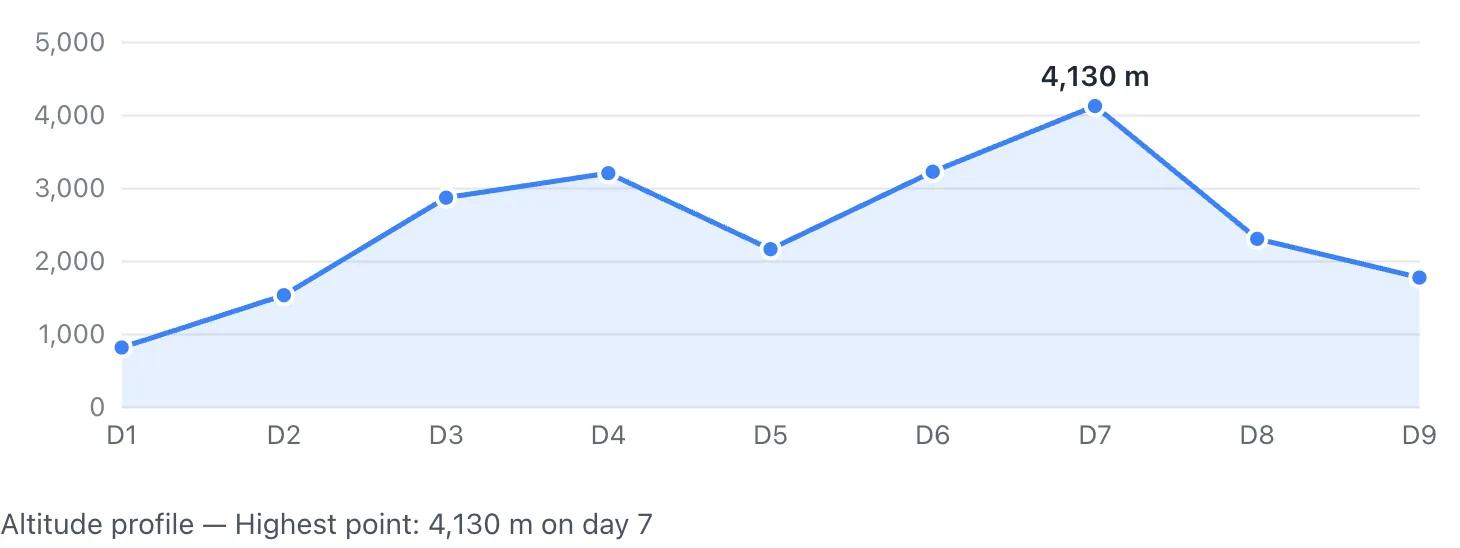
An altitude profile chart for trek itineraries.
Give each itinerary day its highest altitude in metres. With two or more days set, the trip page shows an altitude chart above the itinerary, with the highest point labelled and feet on hover. Each day shows its altitude, and the itinerary PDF lists it.
Bundled in the free Yatra plugin · Listed on WordPress.org
Why Altitude Chart matters for tour operators
Trekkers judge a route by how high it goes and how fast it climbs. A list of day titles doesn't show that, so operators paste in chart images that go out of date when the itinerary changes.
What changes once Altitude Chart is on
Concrete operational outcomes — not feature checkboxes.
- Set an optional highest altitude (metres) on any itinerary day.
- A chart above the itinerary when two or more days have one, with the highest point labelled.
- Feet on hover, and each day's altitude next to its title.
- The itinerary PDF lists the altitude per day.
See Altitude Chart in Yatra
Real screens from a Yatra demo site. Click to enlarge.
Pairs with these Yatra Pro modules
Pro modules that build naturally on top of Altitude Chart. Bundle unlocked by any Yatra Pro license.
Weather Forecast
FreeShow a 7-day forecast for the trip's start location in the booking sidebar, from Open-Meteo. Only the trip's map coordinates are sent, nothing about your visit…
Itinerary Downloader
Pro · StarterA Download itinerary (PDF) button appears in the trip page's itinerary section. The visitor enters their name and email, and Yatra emails them the day-by-day i…
PDF Documents
FreeYatra creates a travel voucher, an invoice for each payment and a full itinerary PDF for every booking. Travelers download them from My Account whenever they n…
How to set up Altitude Chart in Yatra
No engineering. Open Yatra → Modules, toggle, follow the wizard.
-
1
Open a day
Yatra → Itinerary → a day → Edit.
-
2
Enter the highest altitude
In metres. Leave it empty for days where it doesn't matter.
-
3
View the trip
The chart appears above the itinerary once two days have an altitude.
Altitude Chart — Yatra Pro FAQ
Want to feel Altitude Chart in action first? Try Yatra Pro free →
Can I show an altitude chart for a trek on WordPress?
Can I hide the chart but keep the altitudes?
Add Altitude Chart to your tour-booking website today.
Yatra Pro · Free tier · Bundled in the WordPress.org plugin · Yatra 3.3+
Free download · Yatra Pro adds 27 modules.